?unique=e9c6719)

Every email on the right Odoo record, in one conversation
Email Sync+ keeps your mailbox and Odoo in one thread: send with Cc and Bcc from a lead or a contact, Reply All from the chatter, and let a first email from a stranger become a lead on its own.
Odoo email integration that keeps one conversation, not two
Half the thread in somebody's inbox, half in Odoo, and a forward for everyone else. Email Sync+ is the Odoo Gmail integration that files every message on the record it belongs to, in both directions.
Click through the five steps. One email from a stranger travels from your shared address to a closed conversation, and the Odoo lead on the right fills in as it goes.
Demo data. The company and the addresses are invented; the fields are the ones Odoo fills.
What most teams live with
- The full thread lives in one inbox
- Colleagues copied in by forwarding
- A customer reply reaches one person
- New senders retyped as contacts
What changes in the first week
- The whole thread sits on the record
- Colleagues on the Cc, not the forward
- Reply All keeps everyone in it
- New senders become leads by themselves
Native to Odoo, paid once, running on your own mailboxes
The module sits between the mail servers Odoo already knows and the records your team works in. It adds the parts that were missing; it does not add a mailbox.
See an email sent with Cc and Bcc, and the reply landing on the record
The Doodex team sets up sending and receiving, adds a shared alias, writes an email with Cc and Bcc from a contact, and shows the reply arriving back on the same record.
What the video covers- Outgoing and incoming mail server setup
- Adding a shared email alias
- Compose with Cc and Bcc from a contact
- The reply back on the record, then Reply All
Recorded on a test database, so the names and addresses in the video are demo data.
One-time price for Email Sync+
Email Sync+ costs $279 once per Odoo major version, with every user included. No subscription, no per-seat fee and no separate mail service to pay for.
Odoo Community and Enterprise. Unlimited users.
- Cc, Bcc and Reply All from the chatter
- One thread between Odoo and your mailbox
- Leads and contacts created from new senders
- Email aliases and label-based fetching
- Manual book and quick-start guide
- Delivered as a download link by email
Never billed for
Everything below stays inside the $279. These are the lines a mail add-on or a helpdesk tool keeps charging for, month after month and seat after seat.
Moving to a new Odoo major version later needs a new licence, which is the standard Odoo Apps Store model.
Email Sync+ use cases: three inboxes it empties
Three situations teams bring to us, each shown on the real screen of the module. Pick one to see the before and the after.
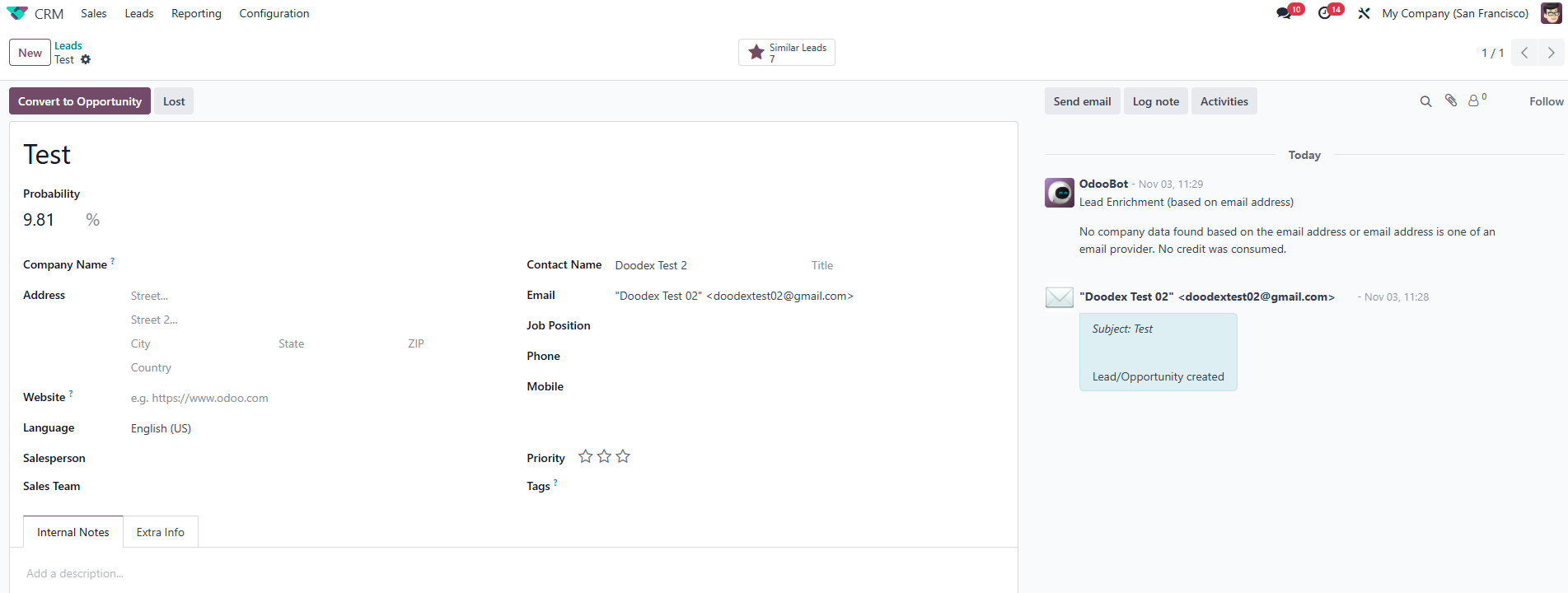
The first email is the one you lose
A stranger writes in for the first time. Somebody has to notice it, type up the contact and paste the message in, or it stays in an inbox.
The lead is created the moment the mail arrives, with the message already on it and a duplicate check against your contacts first.
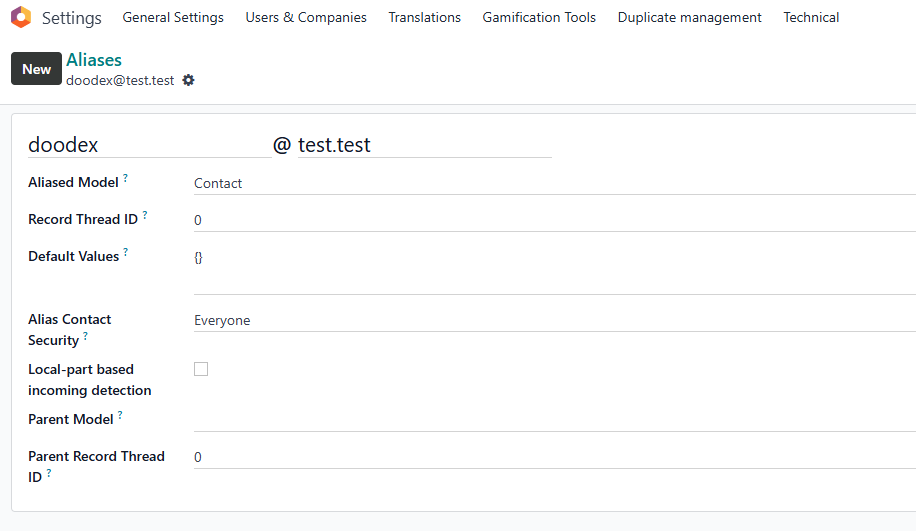
One address, five inboxes, nobody in charge
Mail to info@ or support@ lands in five personal inboxes at once. Everyone assumes somebody else answered it, or two people answer twice.
An alias files each message on the right record instead of in everyone's inbox, and a sender you do not have yet becomes a lead as well.
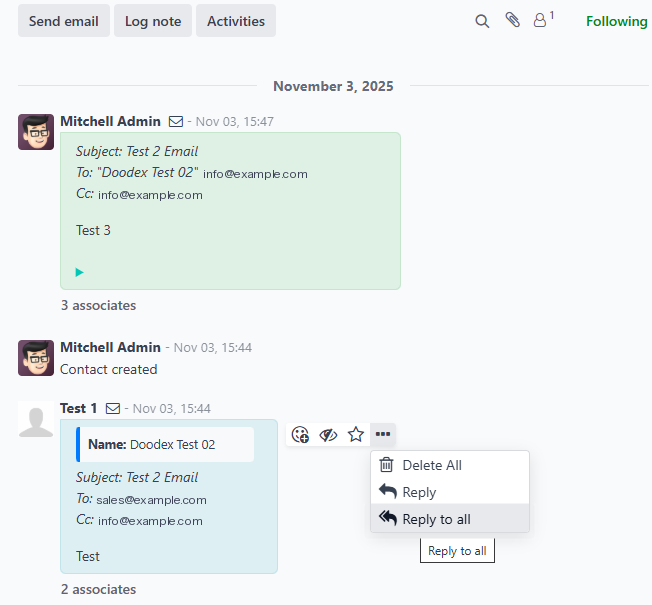
Half the thread is on holiday
The customer replied to one colleague, who is away this week. The cover forwards, asks around, and answers without the last three messages.
Both sides of the exchange sit on the record in order, everyone copied in is recorded, and Reply All answers them all from the chatter.
Odoo CRM email integration, from the first message to the last
Nothing is added beside Odoo. The mail servers you already configured feed the records you already work in, and the thread stays whole from the first enquiry to the signed quote.
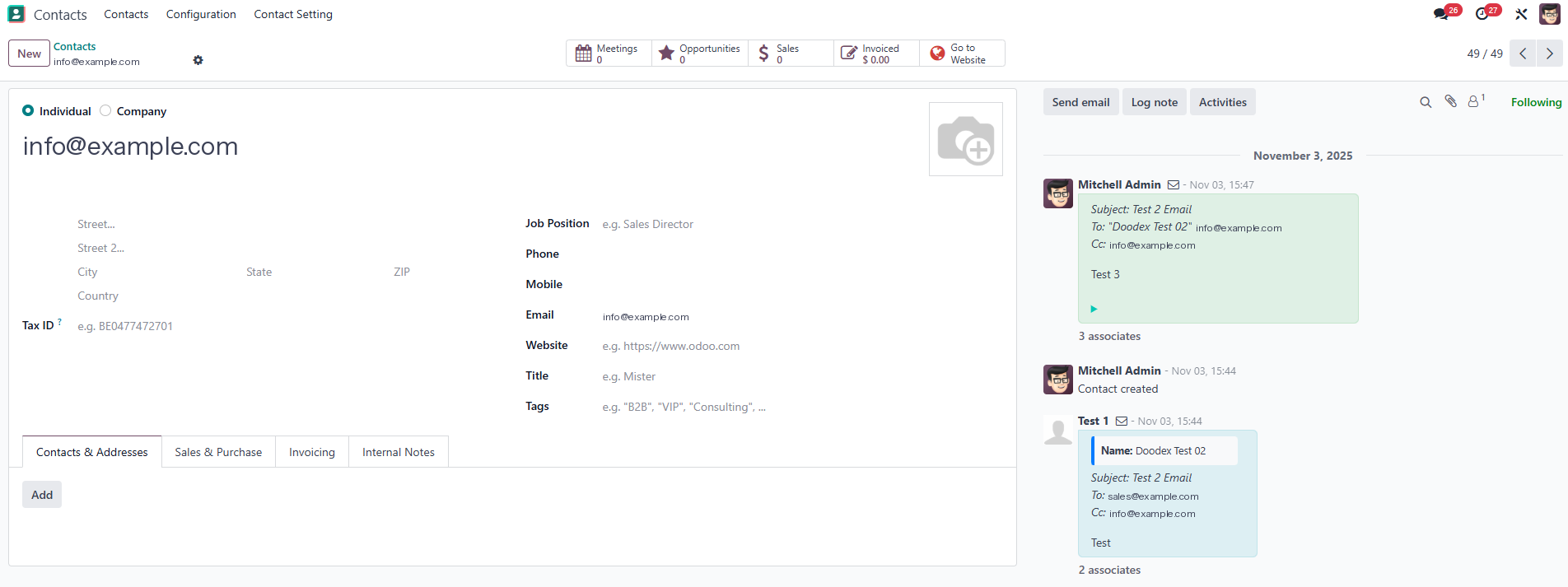
Six roles, and what each one gets from the module
Leads that create themselves
A first email from an unknown address becomes a lead with the message on it. You open it and answer; nobody types the contact in.
A shared address that files itself
Mail to support@ lands on the right record, not in five inboxes. Whoever picks it up sees the whole history before answering.
Reply All without the inbox
Everyone copied on a message is on the record, so one click answers them all from the chatter, and the answer stays there too.
Set up once, in Settings
Outgoing server, incoming server, aliases: the usual Odoo screens, done once. After that the team just writes and reads on records.
The message that agreed the price
Six months on, the exchange still lives on the opportunity, not with whoever happened to be on it. Nothing leaves with an account.
The whole history on day one
Somebody taking over an account reads every message on its records, both directions, without asking a colleague to forward anything.
Built on the mail servers Odoo already supports
Email Sync+ does not bring its own mailbox. It reads and sends through what you connect in Settings:
Six things Email Sync+ adds to Odoo email
Every screen below is the real module running in Odoo, not a mock-up. Click any of them to enlarge it.
Add Cc and Bcc on any email you send from a record
Native Odoo's composer has one recipient list. Email Sync+ adds Cc and Bcc, fills the To from the record, and keeps everyone who received the message on the record afterwards.
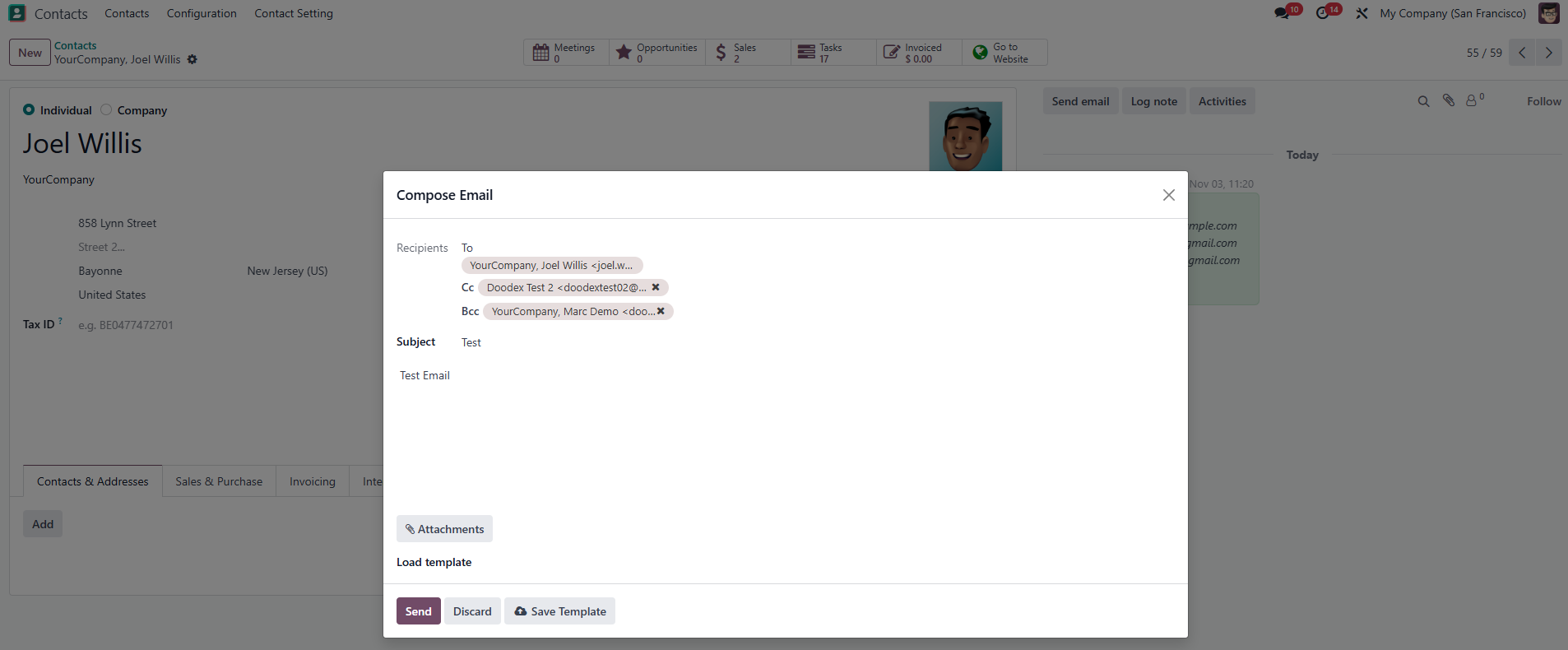
Reply All, without opening your mail app
When a message arrived with other people on it, one click answers all of them from the chatter. The answer stays on the record, with its recipients, and the conversation stays whole.
One conversation, both sides, in order
What you send from Odoo and what arrives in Gmail or IMAP stay in the same thread on the lead, contact, opportunity or sale order. There is no second half to go and look for.
New senders become leads, known ones do not
Mail from an address you do not hold yet creates the lead or contact and files the message on it. If the sender already exists, nothing is created, so the same customer never arrives twice.
Shared addresses that file themselves
Give the team an address like sales@ or support@ that belongs to a record type rather than a person. Mail sent to it lands where it belongs instead of in everybody's inbox.
Bring in only the messages you mark
Label a message in your mail app and Odoo fetches it. Only the mailboxes and aliases you connect reach Odoo, so the noise stays in the inbox and the ones that matter come in.
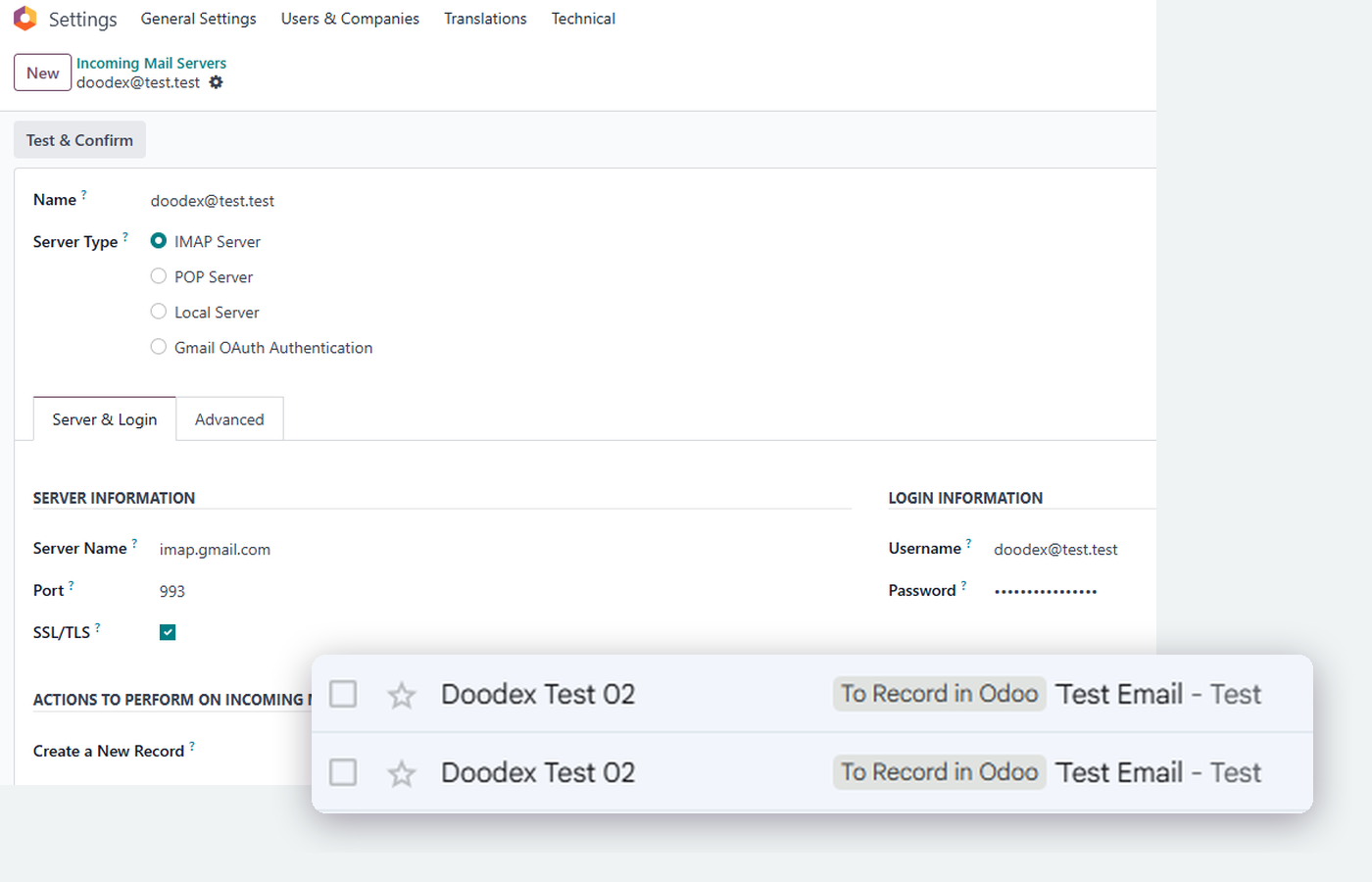
Setup, step by step, on the real screens
Drag the cards, use the arrows or click a card to bring it forward. Five screens, in the order they sit on the menu, and the whole setup is done.
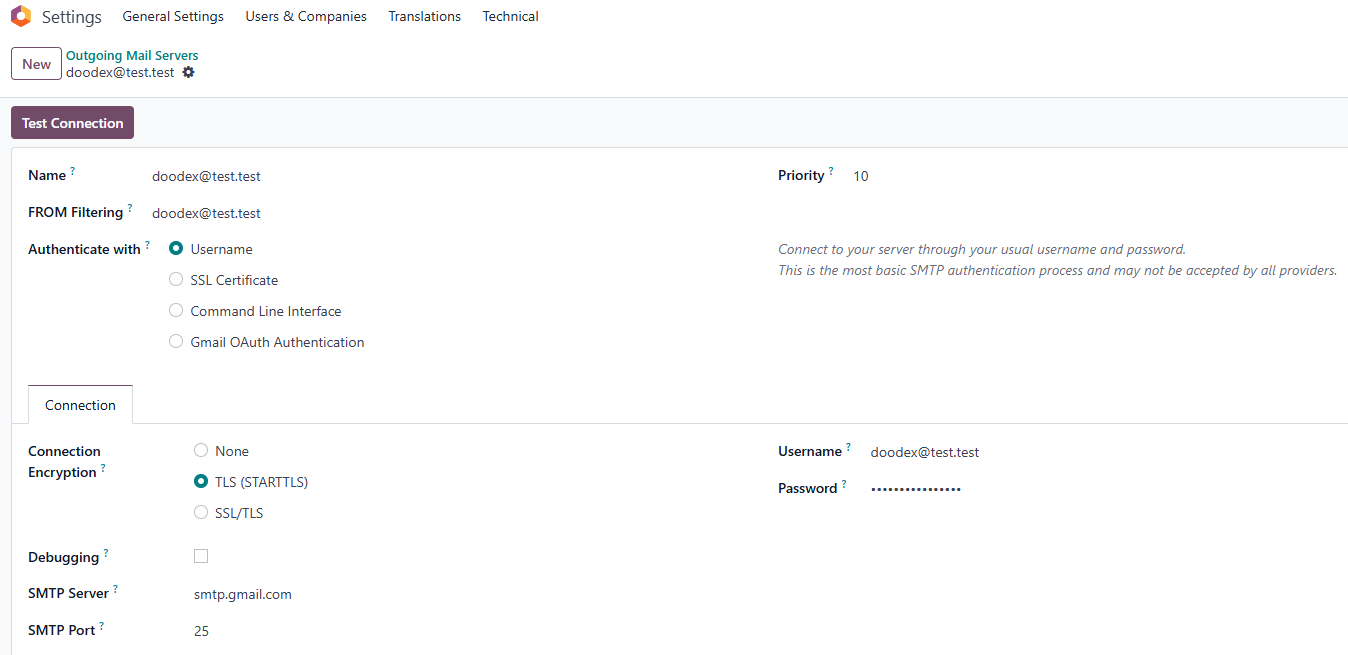
Tell Odoo which mailbox sends
An administrator adds the account mail goes out from under the outgoing mail settings and presses Test Connection before saving.
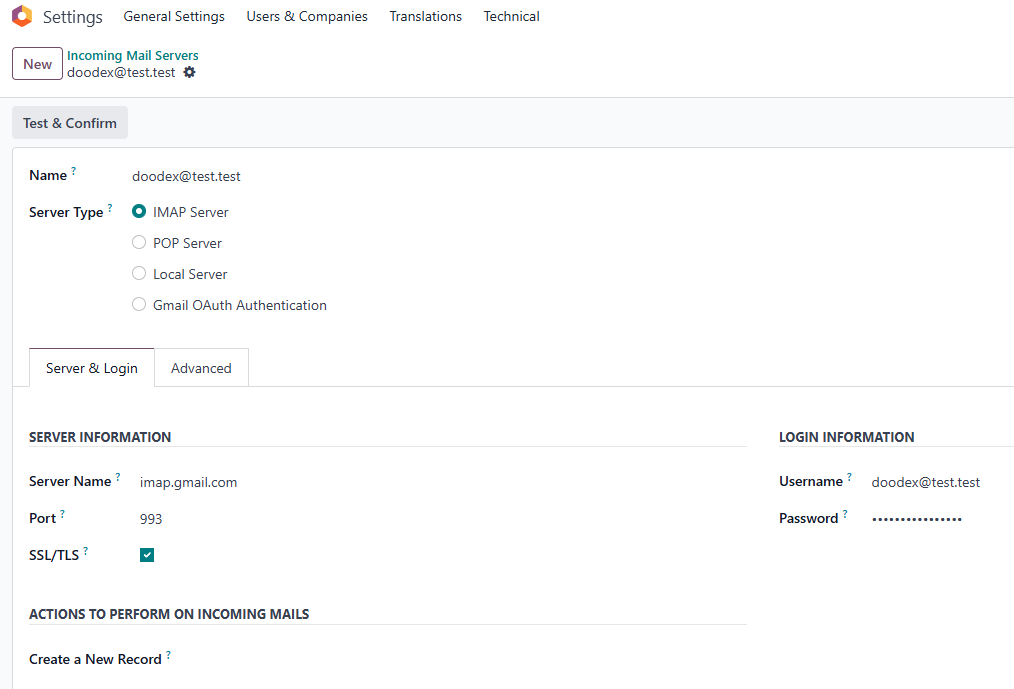
And which one it reads
The same administrator adds the mailbox Odoo should collect from. Odoo checks the connection, and from then on mail arrives by itself.
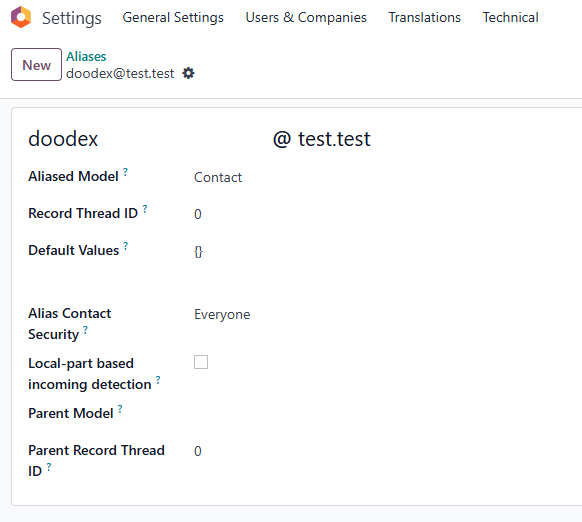
Give the team an address that files itself
An alias like info@ belongs to a record type, not a person. Mail sent to it lands where it belongs, and new senders become leads.
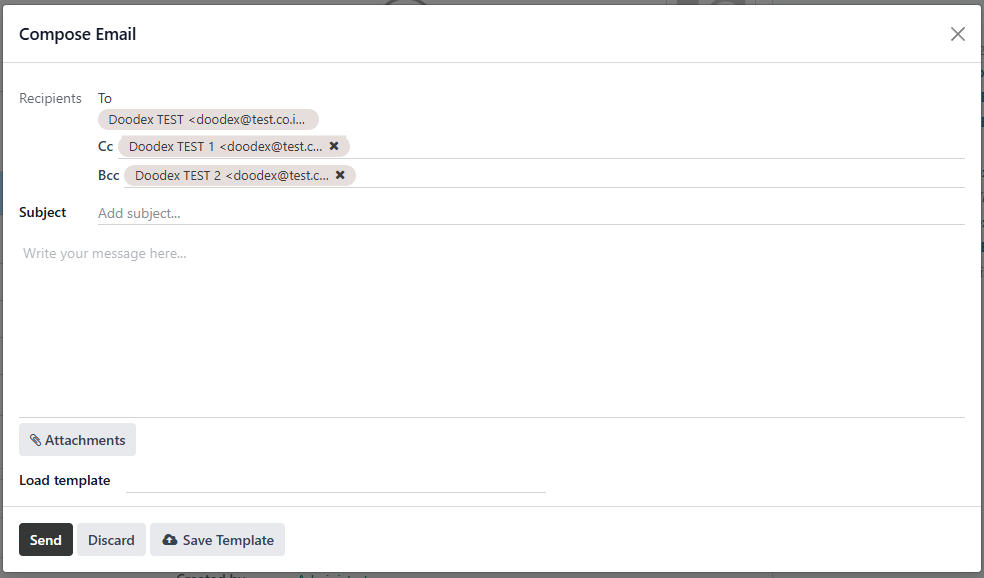
Write it from the record
Open a contact, a lead or a sale order and press Send message. Add Cc and Bcc, attach what you need, send. Everyone stays on the record.
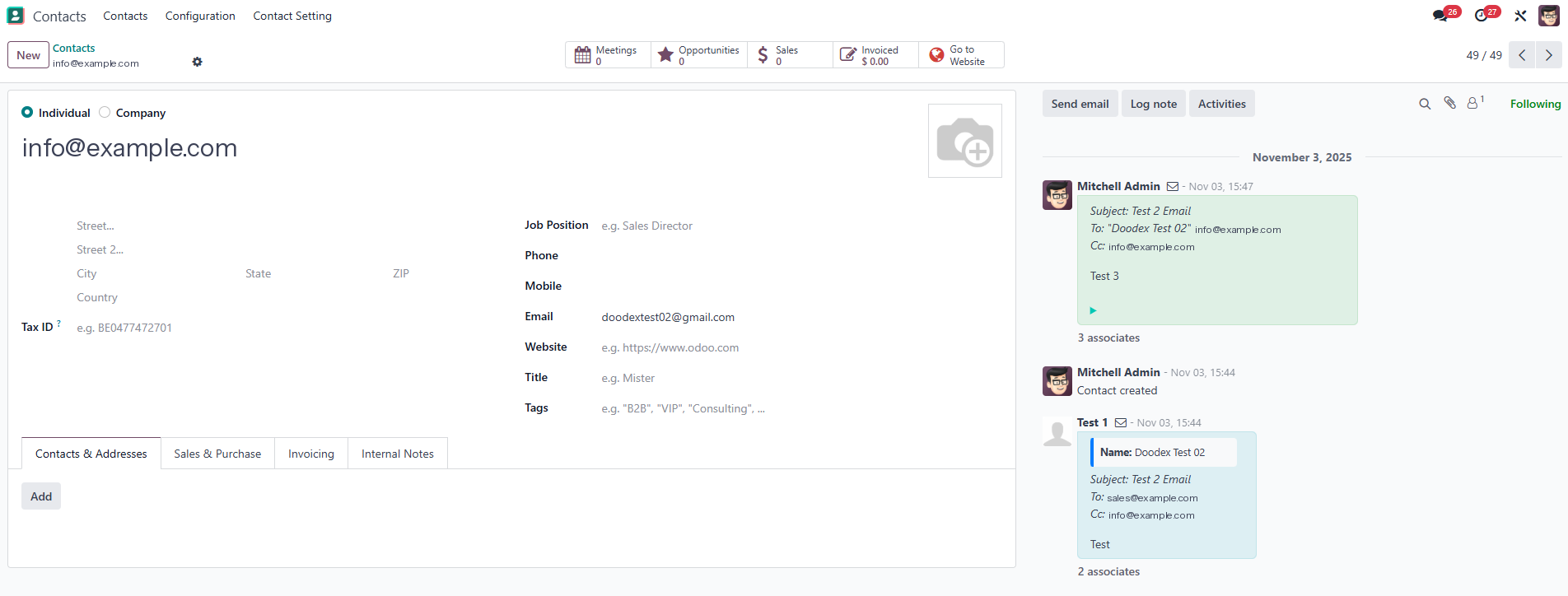
Read the reply in the same place
The answer arrives on the record, in the same conversation, whoever sent it. Who was copied in is part of the record, so Reply All just works.
Odoo already sends email. Why add Email Sync+?
Fair question, and the one buyers ask first. Native Odoo gives you the mail servers and the chatter; Email Sync+ adds the five things they do not do.
The composer has one recipient list: no Cc, no Bcc, and no record of who else received the message.
Cc and Bcc on every email sent from a record, and every recipient kept on the record afterwards.
Answering everyone on a message means leaving Odoo for your mail app, and the answer stays out there.
Reply All from the chatter answers everyone at once, and the answer is filed on the record with them.
Odoo holds its half of the exchange and your mailbox holds the other. Nobody reads the whole story.
Both sides of the conversation sit in one thread on the record, in order, whichever side sent them.
A lead is created only for mail sent to a CRM team alias. A stranger writing elsewhere is typed up by hand.
Any new sender on a connected mailbox or alias becomes a lead or a contact, checked against Contacts first.
A connected mailbox brings in every message it receives, or none of them. There is no middle ground.
Label the messages that belong on a record and only those come in. The rest stays in your mailbox.
Email Sync+ or just forwarding things?
Most teams do not buy a mail tool; they forward. Here is what a forward costs six months later, line by line, against mail that files itself on the record.
| What you compare | Working from the inbox | Email Sync+ |
|---|---|---|
| Where the thread lives | Working from the inbox In whichever inbox got the mail | Email Sync+ On the Odoo record, both sides |
| Copying a colleague in | Working from the inbox A forward, one more copy | Email Sync+ Cc or Bcc, kept on the record |
| Answering everyone | Working from the inbox From your mail app, off the record | Email Sync+ Reply All from the chatter |
| A first email from a stranger | Working from the inbox Typed up by hand, when noticed | Email Sync+ A lead, with the message attached |
| Mail to a team address | Working from the inbox Five inboxes, nobody in charge | Email Sync+ Filed on the record by its alias |
| When someone leaves | Working from the inbox The history leaves with the account | Email Sync+ The history stays on the record |
Everything here can be counted
Six capabilities, five setup screens, one conversation. Anything we cannot show on a real screen of the module stays off this page.
Three things to know before you buy
Only configured senders can send
Sending is limited to users whose address is set up on the outgoing mail server. Everyone can read the mail on a record; an administrator adds senders once.
Mail enters only where you connect
Messages reach Odoo from the mailboxes and the aliases you connect, and from nowhere else. A note in an account nobody connected never shows up there.
It installs with Activity Comments
The module depends on Doodex Activity Comments and on Odoo CRM, Contacts, Discuss and Email Marketing. Odoo installs them alongside it in one go.
What comes with the licence
Doodex services for the work around the module
The module covers sending, receiving, aliases and the thread. When a project needs more than that, these Doodex teams pick it up, quoted separately from the licence.
Thirteen questions buyers ask before adding Email Sync+ to cart
The answers that decide a purchase, stated plainly. Missing one? Email the team and ask about your own mail setup.
Is $279 a one-time price or a subscription?
One time, per Odoo major version. There is no subscription, no per-seat fee and no paid add-on, and every user you add later is included.
Which Odoo edition do I need?
Odoo Community or Odoo Enterprise, both are supported. Pick the Odoo version that matches your database in the selector next to the price.
Do I need Gmail to use it?
No. It works through Odoo's incoming and outgoing mail servers, so Gmail, Google Workspace or any IMAP and SMTP mailbox will do. Label-based fetching is the extra you get with Gmail.
Do I have to email first for the thread to work?
No. A first message from a customer is captured on its own, even if nobody has written to them from Odoo before.
Does every new sender become a lead?
Only the ones you do not already have. If the address is already in your contacts, nothing new is created and the message simply files itself on the existing record.
Can I send a copy without showing the address?
Yes. Bcc does exactly that, and the recipient is still recorded on the record afterwards, so you can see who received the message.
Will Cc and Bcc from my mailbox show up in Odoo?
Yes. Everyone who was on the message is recorded on the record, which is what makes Reply All from the chatter possible.
Can I choose which messages come in?
Yes. Label a message in your mail app and Odoo fetches it, so you bring in the ones that belong on a record and leave the rest alone.
A colleague cannot send. Why?
Their address is not on the outgoing mail server yet. An administrator adds it once, and they can send from any record from then on.
Does it replace Odoo's own email?
No. It uses the same incoming and outgoing mail settings native Odoo already has, and adds the parts that were missing: Cc, Bcc, Reply All, one thread and leads from new senders.
Can I attach files to an email?
Yes, from the composer on the record. Mail providers and Odoo both cap attachment size, usually somewhere between 10 and 25 MB, so past that send a link rather than the file.
How do I get the module after buying?
By email. The purchase confirmation carries the download link for the module ZIP. Install it from Apps on your own server or on Odoo.sh, like any other module.
What support is included?
Support by email at [email protected] for bugs and errors, answered during working hours. The manual book and the quick-start guide ship with the module.
Compatibility, requirements, licence and release history
No hidden prerequisites. The editions it runs on, the requirements listed one by one, and what each release contains.
Pick your Odoo version in the selector next to the price. Each version has its own build of the module.
Odoo Community or Odoo Enterprise. Pick the version that matches your database in the selector next to the price.
CRM, Contacts, Discuss and Email Marketing, plus the Doodex Activity Comments module, all installed alongside it.
Odoo.sh or your own server: anywhere you are able to install a module from a ZIP file yourself.
Gmail, Google Workspace or any IMAP and SMTP mailbox, set up in the standard incoming and outgoing mail settings.
Unlimited. The licence does not count seats, so adding a colleague later costs nothing more at all.
Anyone can read the mail on a record. Sending is limited to users whose address is set up on the outgoing mail server.
Added from the composer on the record. Mail providers and Odoo cap the size, usually between 10 and 25 MB.
By email at [email protected], for bugs and errors, answered during working hours. Documentation ships with the module.
Install it from Apps, add your outgoing and incoming mail servers, create an alias, then send your first email from a record.
| Product | Email Sync+ for Odoo |
| Price | $279.00 USD, one time, per Odoo version |
| Module technical name | email_sync |
| Licence | OPL-1, as stated on the module listing |
| Odoo edition | Community and Enterprise |
| Depends on | CRM, Contacts, Discuss, Email Marketing, Doodex Activity Comments |
| Author and maintainer | Doodex, Odoo Official Partner |
| Support | By email, [email protected] |
One purchase covers the module for the Odoo version you pick. A new major version later is a new purchase, the standard Odoo Apps Store model.
- Current1.0
- Cc and Bcc on the chatter composer, kept on the record after sending.
- Reply All from the chatter, so everyone on a message stays in the conversation.
- Incoming and outgoing mail kept in a single thread with your mailbox.
- Automatic lead or contact creation for senders you do not already hold.
- Email aliases that file a message onto the right record.
- Label-based fetching, so only the messages you mark are brought in.
- Next releases
Every Email Sync+ release is listed here with what it changes. If a version is not on this list, it does not exist.
Put every email where the deal is
Watch the walkthrough, then add Email Sync+ for $279 when you are ready. One purchase, every user, and the whole conversation on the record from the first email.
Email Sync+ for Odoo, by Doodex. The screens on this page are captures of the real module running in Odoo; the hero animation is an illustration with demo data.